Parameter Sniffing & Stored Procedures Execution Plan
This post is an attempt to explain what parameter sniffing is all about and how it affects the performance of a stored procedure. I would be walking through an example to demonstrate what the effect of parameter sniffing is. I will be showing the query execution plan generated for SQL Server 2005. To my knowledge, there is no change, in how this process works, between the two versions and you should be able to relate it to SQL Server 2000 as well.
According to the white paper,Batch Compilation, Recompilation, and Plan Caching Issues in SQL Server 2005 published in the Microsoft Site:
"Parameter sniffing" refers to a process whereby SQL Server's execution environment "sniffs" the current parameter values during compilation or recompilation, and passes it along to the query optimizer so that they can be used to generate potentially faster query execution plans. The word "current" refers to the parameter values present in the statement call that caused a compilation or a recompilation.
Before I go ahead with the example, you need to understand that the query execution plan generated by the query optimizer depends on a lot of factors and parameter sniffing is just one of them. So the execution plans I show here might not be the execution plan you get if you run the same query on your server.
Lets consider the Orders table in the Northwind database.
Say, I create a stored procedure with the definition as:
create procedure GetOrderForCustomers(@CustID varchar(20))
as
begin
select * from orders
where customerid = @CustID
end
Remember, that the query execution plan is not generated when you create the procedure. It gets created and cached the first time you run it.
First lets look at the distribution of the number of orders for each customer
Running the following query in the Northwind database:
select top 100 percent customerid,count(*) as OrderCount from orders
group by customerid order by count(*)
We get the number of orders placed by each customer (Only partial result shown)
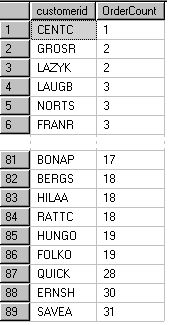
The first and the last customer are the ones we are interested in:
CENTC has OrderCount (min) = 1
SAVEA has OrderCount (max) = 31
Lets say, I want to find all the orders for CustomerID = 'SAVEA' by calling the stored procedure that we created before.
exec GetOrderForCustomers 'SAVEA'
Since this is the first time the stored procedure is called, it will create an optimized query execution plan and execute it.
Now, the stored proc will return me 31 rows. Let's look at the query execution plan.
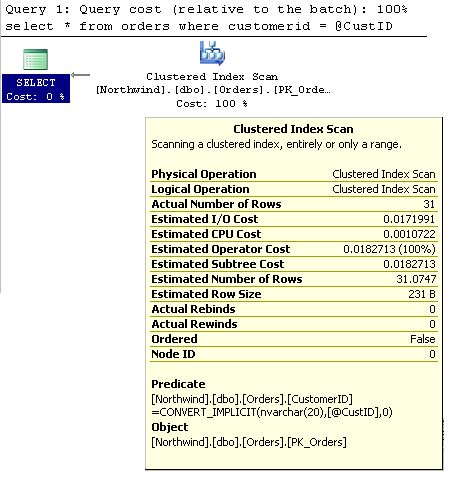 Two values in the Clustered Index Scan information are of interest to us.
- Actual Number of Rows 31
- Estimated Number of Rows 31.0747
How did the optimizer correctly estimate the actual number of rows?
It's because of what we call "parameter sniffing". The optimizer created the plan knowing the fact that it was going to get the information for the customerID 'SAVEA' and hence retrieve 31 rows.
Then how did the optimizer know that 'SAVEA' has 31 orders?
SQL Server internally maintains the statistics and distribution of the values in the columns used for filtering. Which, inturn, is nothing but the information in the result of this query (which we used above)
select top 100 percent customerid,count(*) as OrderCount
from orders group by customerid
order by count(*)
Then, what is the problem with parameter sniffing, if its helping the query optimizer do better optimization?
Check out the query execution plan, again, for a different input (CustomerID = 'CENTC'):
exec GetOrderForCustomers 'CENTC'
 Did you notice that the estimated number of rows is still 31 when the actual number of rows is 1? This plan was optimized for retriving 31 rows (in the first run) and the plan stays in the cache for reuse till server is restarted or the procedure is recompiled or if the proc cache is removed because of any other reason. And so, we need to understand that this plan may or may not work with the same efficiency for retrieving 1 row.
Now, lets see what is the efficient plan (in my server) for retrieving the orders for 'CENTC'. For that I need to clear the current execution plan. Let's drop and recreate the stored procedure so that the plan cache is removed.
drop proc GetOrderForCustomers
go
create procedure GetOrderForCustomers(@CustID varchar(20))
as
begin
select * from orders
where customerid = @CustID
end
Now that the plan cache is cleared, a fresh query execution plan will be generated for the input I give in the following procedure call.
exec GetOrderForCustomers 'CENTC'
Let's look at the query execution plan now.
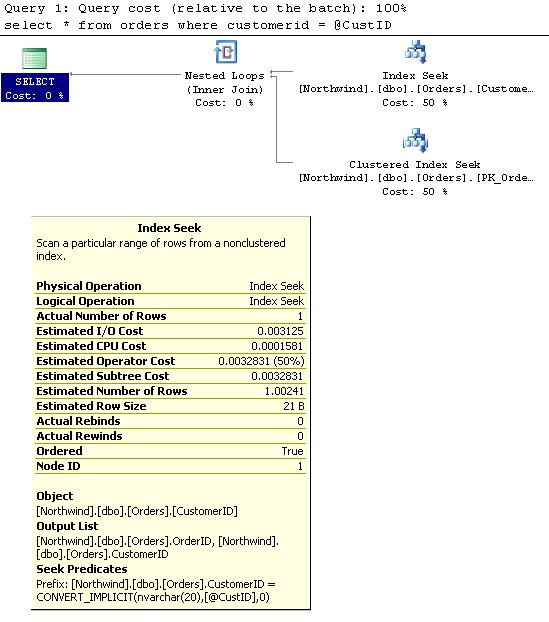 Now, do you notice that the plan has changed and the estimates also have changed
 - Actual Number of Rows 1
- Estimated Number of Rows 1.00241
If you call the procedure again with 'SAVEA' as the input, you will see that the plan will be the same and estimated number of rows will still be 1 though the actual rowcount will be 31.
So, either way it all depends on which input I give the first time I call the stored procedure.
But, It's impossible to keep track of when the plan was created and what was the input it used. In that case, we have an option here to disable the dependency on the input parameter.
We can create local variables and assign the input parameter to the local variables and use the local variables in the query. And in that case, since we didn't use the procedural parameter directly in the query, it will generate a generic query execution plan.
The same stored procedure can be written this way to avoid parameter sniffing:
create procedure GetOrderForCustomersWithoutPS(@CustID varchar(20))
as
begin
declare @LocCustID varchar(20)
set @LocCustID = @CustID
select * from orders
where customerid = @LocCustID
end
Now, when you run the stored procedure with the input as 'SAVEA'
exec GetOrderForCustomersWithoutPS 'SAVEA'
This is the query execution plan that I get.
 Here you see that the actual number of rows is 31 whereas the estimated number of rows is not 31, but its close to 9. Its clear in this case that the query optimizer did not use the parameter value for generating the query execution plan. Then, from where did it get the value 9?
You may guess, just like I did. We saw the distribution of the number of orders for each customer. Now, lets find the average number of orders per customer.This query finds the average of ordercount of all customers we got from the previous query:
select avg(OrderCount) from
(select top 100 percent customerid,count(*) as OrderCount
from orders
group by customerid
order by count(*)) b
Or it can be simply written this way:
select 1.0*count(*)/count(distinct customerid) from orders
You will see that the output is:
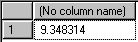
Well, this is the estimated rowcount that we saw in the execution plan.If you look at it, for the current data, 67 out of 89 distinct customers have ordercount between 4 (9-5) and 14 (9+5) orders. So, execution plan generated should work good for the majority of the customers. Hence, disabling parameter sniffing is a good choice in this case.
A few points to note:
- Parameter sniffing can be enabled or disabled at the stored procedure level.
- We need not use local variables (to disable parameter sniffing) if the amount of data you will retrieve from the table is evenly distributed for all values of the filtered column (example, search by primary key or unique key)
- Parameter sniffing can be disabled (by using local variables) if we see a bell curve distribution in the number of rows retrieved for the filtered column.


 Posts
Posts


70 comments:
Very interesting article.
One wonders though why this doesn't happen more often, as most queries tend to return resultsets of vastly different sizes. Yet the parameter sniffing problem seems to only occur in certain types of (complex) queries.
In any event, thanks for the solid info which allowed us to rapidly solve a performance problem in one of our production system.
Henri
Very nice write-up - thanks :)
Thank-you very much!
This fixed a performance problem in a recursive function, where the plan seemed to get progressively worse the deeper the recursion went, and RECOMPILE didn't work.
Phew!
Thanks, this was really driving me to distraction.
I simply couldn't work out why a stored procedure would take an hour and a half and the same code in a batch completed in a minute.
It really made that much difference.
Keep up the good work.
Oh~my god !!
you are my god because you slove my problem.
A fews days ago I helped my friend resolve a query of similar nature. In a batch the query took about a minute. When he turned it into a stored procedure it run for about 9hours and going...I was able to re-write the query using a derived table instead of the normal join and it run fine.
Here is the nature of his query: It the takes a string of comma separated values. Parses the strings and puts into a temporary table. Then uses the temporary table to join with some other tables.
Your post makes a lot of sense!
Thanks, Kuyi.
Ultimate
Really good information with full of details.
thank you very much...
keep going with good articles.
Fantastic little trick that sped up my stored procedure from 20 minutes to 2 seconds. Thanks!
Now, I'm a bit confused as to when it's best to use Local variables and when not to.
I've always followed the recommendation from Microsoft to avoid the use of Local variables to achieve high performance stored procedures based on the following article:
http://www.microsoft.com/technet/prodtechnol/sql/2005/qrystats.mspx
and this one:
http://www.sqlprof.com/blogs/sqlserver/archive/2008/03/29/avoid-using-local-variables-in-your-select-statements.aspx
Any comments suggestions would be welcome.
Thanks,
Phil
Phil,
If you are looking for a straight yes or no.... :)
What the technet poster suggests is that using an OPTION RECOMPILE is better than using a local variable, which is fine as long as coming up with a new execution plan with the current input parameters doesn't add too much of an overhead.
RECOMPILE option is definitely something you can consider which I have missed in my post.
But I still stand by my suggestions for the specific cases I have stated.
-Omni
Great article. Crazy how something you wrote so long ago is still so relevant. I'm smarter for having read it. I will now subscribe to your blog.
You are the man!
This is very helpful. Thanks a million.
This is nice information... thanks a lot!
NICE, thank you very much, I got a store procedure, that takes 14:17 minutes, and with the change, it now takes 30 seconds!!!
Very educative piece...A developer at work pointed me to this blog and I'm smarter now because I read it. The little things never cease to matter...Good job on this.
Awesome ! Thank you for a great article and information.
Saved my proverbial "arse"
Thank you
That'd too good ..
Clear explanation ... Even i amnew to SQL.. i can understand ... please Continue ... writing such articles .
Thanks for detailing "parameter sniffing". It help me debug a slow stored procedure, which had an XML input parameter.
http://www.oaktreesw.net
Very helpfull article!
PingBack:
http://madebysql.blogspot.com/2009/07/execution-time-difference-between-sp.html
brilliant thanks. this and http://elegantcode.com/2008/05/17/sql-parameter-sniffing-and-what-to-do-about-it/ this really helped me nail a long-term query performance problem
Very informative and very well written.
Thanks
Just wanted to say thanks!
Brilliant article. Thanks. And it's quite well written so that the problem and the solution is clearly understandable.
It is very rare that I learn that have a widespread effect on how I write SQL code, but I just did today.
Thank you so much. Truly un-expected behavior.
Great post. Covers complete detail.
Thanks a lot, it solved mysterious too long execution of sp
I have been asked Question during Microsoft interview like this "Stored Proc runs perfactly fine and few days later same Proc takes 15-20 Minutes to execute.What will be the potential problem here?
Thank you in advance
Thanks for this article. It's a really interesting read and saved the day when one of my procs slowed down!
Great Article.
Thanks
Thanks alot dude... keep up the work!!
Great Job and thanks very much! I notice this problem some months ago but it's your wonderful solution which help me solving this problem completely! (I was using WITH RECOMPILE procedure hint to solve this problem but it did not work well on large SQL procedures...)
Really great and wonderful!
SQL Server 2008 SP1 Cumulative Update 7 and SQL Server 2005 SP3 Cumulative Update 9 introduce trace flag 4136 that can be used to disable the "parameter sniffing" process, see http://support.microsoft.com/kb/980653/
Thanks for the very clear explanation - it helped me get the execution time down from 20 minutes to 12 seconds!
Fantastic explanation. Its a shame I spent 4 hours tearing my hair out before I found this article. ;)
Great explanation! Thanks! That really helped me with a recent problem I had
Thanx dude. Our team sat for hours trying to figure out why a SP takes 5min to run while the inner script took 8sec on it's own.
Applied the local vars solution and bam, 8sec.
nice One !
Hmm.
This seems to give a lot of meaning, but is it something I didnt get here.
I have this SP that runs 15 seconds in SQLserver management studio, and when I run the same thru Reporting services it takes approx 5 minutes.
I've change the sp, so that it uses locally defined variables in the where statements.
Jostein
Is it still a reason why Reporting services should take 100 times longer than the actual run of the SP ? (And yes: I did try with defining the sp with recompile, seems to make no difference.
Hmm - is it something I didn't properly get in this ? - I seem to have same cause of problem, but cannot fix it by declaring variables and using them inside my stored procedure.
My SP has approx 10 joined views (select.... ) as xxx inner join ....)
It runs in 5 seconds from sql server management studio, it takes 5 minutes or so when I run the same thing from Reporting services.
I even tried with Optimise for... and recompile.
Any other reason it could be that the same procedure takes forever when running thru reporting services ?
Jostein
Many thanks for the clear explanation
Great article
I have a similar problem where a simple stored procedure times out (takes more than 30 seconds when executed from a Delphi client), but running the procedure from management studio takes 1 second.
As soon as I alter the procedure, it starts working fast again.
My question is, why the procedure (with the same parameters) runs fast in management studio? If it was parameter sniffing, wouldnt be affecting every client?
thanks again for the great article.
Ok I have seen loads of posts of using option (recompile) and using local variables in a stored procedure. What about if you are not in control of the generation of the query, as when using Dynamics CRM. It's queries are passed into the sp_executesql stored proc with a literal string of the query & parameters. This gives the same parameters sniffing problem. If i capture the SQL query being produced using profiler & then re-run in management studio, i see the use of a old plan & the query taking minutes. If i amend the query string and add a option (recompile) or actually just adding a space in the string - the query plan is re-evaluated and the results are returned within a second. Trouble is the CRM platform is generating the query so I cant intercept. Is there a way to fix this at a server level???
Very good article. Nicely explained.
good article. my sproc went from 34 seconds down to 1.5. thanks, james
Just to answer some questions about differences in performance from different clients, each connection that is determined to be different (even a slightly different connection string from the same application) keeps its own execution plans. This is why the same stored procedure may run fast in query analyzer while being slow in an application.
great information, my sp improved from 79s to 1.5s, you saved me tons of time and painful diagnosing.
This article and recommendation/solution saved us a ton of time! Thank you for writing and posting it.
Thx a million, my improvement : from 150 s to 2 s.
This solution worked for an SQL 2008 R2 environment.
Amazing information! thanks for the post.
Have to say a very clear and well paced explanation of this issue, bravo!
Please Help....
If I Run this:
SELECT --A.ItemNmbr, A.Dex_Row_Id, A.CreationDate, A.UpdateDate, --B.ItemNmbr, B.Dex_Row_Id, B.CreatdDt, B.ModifDt
count(A.ItemNmbr)
FROM Database1.dbo.Item as A, Database2.dbo.IV00101 B with(nolock)
WHERE A.Dex_Row_Id = B.Dex_Row_Id And A.ItemNmbr <> B.ItemNmbr And
(A.CreationDate = B.CreatdDt Or (A.CreationDate = '2008-01-01 00:00:00.000' And B.CreatdDt = '1900-01-01 00:00:00.000'))
then
time = 0
but is I run this:
IF (SELECT count(A.ItemNmbr)
FROM Database1.dbo.Item as A, Database2.dbo.IV00101 B
WHERE A.Dex_Row_Id = B.Dex_Row_Id And A.ItemNmbr <> B.ItemNmbr And
(A.CreationDate = B.CreatdDt Or (A.CreationDate = '2008-01-01 00:00:00.000' And B.CreatdDt = '1900-01-01 00:00:00.000'))
) > 0
BEGIN
PRINT 'UPDATED'--@strMsg
END
It takes 22 secs...
Could you help me to know why???
Thank you,
Glenn
Very informative article. This saved me. Thanks a lot.
Amazing! thanks man
Thank you for the post, it's really helping me alot...
Man Woow from 7 minutes to 1 second,
its even faster than normal query specially if you considered using temp table to hold the set off all possible values instead of directly filtering data from the source query then filter
the results from the temp table.
Fantastic Information Thanks.
I knew there must be an answer! Thanks.
FYI - coming from an SSRS report issue...
The query worked in SQLServer
Running the query from the query preview window in SSRS was slow - and that is the clue, because it eliminates the considerations that formatting, expression formula etc are causing the slowness.
nice information,thanx a lot
Excellent post,earlier my SP was taking 1+ minutes where now it is taking less than 1 sec. Thanks a ton.....
Thanks a lot - worked a treat. 7mins -> 1 sec.
Thanks, this solved my problem but the explanation doesn't seem to apply to my case because:
1) Using WITH RECOMPILE option makes no difference.
2) Calling the procedure with the same parameters as when it was compiled makes no difference.
Both these *should* give a similar performance improvment as the local variable solution. My conclusion is there is something goign wrong with the optimiser when it attempts "parameter sniffing" (in some cases).
Life saving post.
Stuck in this issue for last two days, found not a single clue. Thanks
very good explanation of para sniffing
very informative article with good examples
The never ending SP just ran in 1 minute. You are the best!!!!!!!!!
This post is STILL appropriate 8 years later and in SQL 2012. I had tinkered with setting ANSI_NULLS ON since part of my update query which ran in milliseconds in Mgt Studio but took 45 seconds inside the stored proc, but quickly eliminated that as having NO effect in either environment. Switching to local variables immediately allowed the proc to perform the update in milliseconds. Thanks SO much for this, and I'm SO glad it is still linked from within this post: http://stackoverflow.com/questions/440944/sql-server-query-fast-but-slow-from-procedure
This is still an issue with SQL Server 2012 (and probably will be with 2014) so a nice solution to a time-consuming problem. Thanks for the info!
Good example and detail explanation (+ snapshots), thx for ur article
Excellent article. Thank you very very much.
Post a Comment